
Recent Posts
The Tips You Need to Successfully Start a Blog
Starting a blog can seem overwhelming, but in truth, it's one of the simplest ways to join the online community. Follow these tips to ensure your blog is positioned for success.
1. Define Your Goals
Before you start a new blog, it's essential that you define your goals for it. Your blog has a greater chance of success if you know from the beginning what you hope to accomplish with it. Are you trying to establish yourself as an expert in your field? Are you trying to promote your business? Are you simply blogging for fun and to share your ideas and opinions? Your short and long term goals for your blog are dependent on the reason why you're starting your blog. Think ahead to what you'd like to gain from your blog in six months, one year and three years. Then design, write and market your blog to meet those goals.
2. Know Your Audience
Your blog's design and content should reflect the expectations of your audience. For example, if your intended audience is teenagers, the design and content would be quite different than a blog targeted to corporate professionals. Your audience will have inherent expectations for your blog. Don't confuse them but rather meet and exceed those expectations to gain reader loyalty.
3. Be Consistent
Your blog is a brand. Just like popular brands such as Coke or Nike, your blog represents a specific message and image to your audience, which is your brand. Your blog's design and content should consistently communicate your blog's overall brand image and message. Being consistent allows you to meet your audience's expectations and create a secure place for them to visit again and again. That consistency will be rewarded with reader loyalty.
4. Be Persistent
A busy blog is a useful blog. Blogs that are not updated frequently are perceived by their audiences as static web pages. The usefulness of blogs comes from their timeliness. While it's important not to publish meaningless posts else you may bore your audience, it's essential that you update your blog frequently. The best way to keep readers coming back is to always have something new (and meaningful) for them to see.
5. Be Inviting
One of the most unique aspects of blogging is its social impact. Therefore, it's essential that your blog welcomes readers and invites them to join a two-way conversation. Ask your readers to leave comments by posing questions than respond to comments from your readers. Doing so will show your readers that you value them, and it will keep the conversation going. Continue the conversation by leaving comments on other blogs inviting new readers to visit your blog for more lively discussions. Your blog's success is partially dependent on your readers' loyalties to it. Make sure they understand how much you appreciate them by involving them and recognizing them through meaningful two-way conversation.
6. Be Visible
Much of your blog's success relies on your efforts outside your blog. Those efforts include finding like-minded bloggers and commenting on their blogs, participating in social bookmarking through sites such as Digg and StumbleUpon, and joining social networking sites such as Facebook and LinkedIn. Blogging is not a demonstration of, "if you build it, they will come." Instead, developing a successful blog requires hard work by creating compelling content on your blog as well as working outside of your blog to promote it and develop a community around it.
7. Take Risks
Beginner bloggers are often afraid of the new blogging tools and features available to them. Don't be afraid to take risks and try new things on your blog. From adding a new plug-in to holding your first blog contest, it's important that you keep your blog fresh by implementing changes that will enhance your blog. Alternatively, don't fall prey to every new bell and whistle that becomes available for your blog. Instead, review each potential enhancement in terms of how it will help you reach your goals for your blog and how your audience will respond to it.
8. Ask for Help
Even the most experienced bloggers understand the blogosphere is an ever-changing place and no one knows everything there is to know about blogging. Most importantly, bloggers are part of a close-knit community, and the majority of bloggers understand that everyone is a beginner at some point. In fact, bloggers are some of the most approachable and helpful people you can find. Don't be afraid to reach out to fellow bloggers for help. Remember, the success of the blogosphere relies on networking, and most bloggers are always willing to expand their networks regardless of whether you're a beginner blogger or seasoned pro.
9. Keep Learning
It seems like everyday there are new tools available to bloggers. The Internet changes quickly, and the blogosphere is not an exception to that rule. As you develop your blog, take the time to research new tools and features, and keep an eye on the latest news from the blogosphere. You never know when a new tool will roll out that can make your life easier or enhance your readers' experiences on your blog.
10. Be Yourself
Remember, your blog is an extension of you and your brand, and your loyal readers will keep coming back to hear what you have to say. Inject your personality into your blog and adapt a consistent tone for your posts. Determine whether your blog and brand will be more effective with a corporate tone, a youthful tone or a snarky tone. Then stay consistent with that tone in all your blog communications. People don't read blogs simply to get the news. They could read a newspaper for news reports. Instead, people read blogs to get bloggers' opinions on the news, the world, life and more. Don't blog like a reporter. Blog like you're having a conversation with each of your readers. Blog from your heart.

Widgets are a handy, easy and simple way to add some flare to your blog. Whether you’d like to display the number of currently online visitors to your site or simply the weather report for Los Angeles, you can do it with widgets. We’ve assembled a list of 50 useful or simply cool widgets for your pleasure. And remember, the first rule of widgetizing your blog is - don’t overdo it!
- MyBlogLog’s Recent Readers - this widget can easily be called a hit amongst blog owners; its popularity even managed to convince Yahoo into buying MyBlogLog. The widget lets you see the avatars of recent visitors to your blog, provided they’re also members of MyBlogLog.
- Mashable - get the latest social networking news from this very site.
- Flickr Flash Photo Stream Badge - display images from your Flickr profile with a handy Flash photo stream.
- Preview Anywhere - see a live preview of outgoing links in a small popup which activates on mouseover. Some find this annoying, while others might find it useful.
- Twitter Badge - if your life is so interesting that everyone must know what you’re up to all the time, then a Twitter badge is the ideal counterpart to your blog. It’ll proudly displays your recent tweets.
- Digg News - display the latest Digg links on your blog. Themeable and fully customizable.
- FEEDJIT - real time traffic data directly in your blog’s sidebar.
- LineBuzz - inline comments for your blog. Very handy for blogs with frequent lively discussions.
- Flixn - display a stream directly from your webcam, so your blog visitors can always see what you’re up to.
- 3Jam - lets your visitors send messages to your mobile phone, without them knowing your phone number.
- Jaxtr - with Jaxtr, your visitors can actually call you to your mobile phone; again, your number stays private.
- LinkedInABox - show off your LinkedIn profile. Perfect for personal blogs.
- Box Widget - enable visitors to use box.net’s online storage directly on your web site.
- Price of gas - displaying gas prices on your blog might seem unnecessary to some, but it’s cool if you have a traffic/travel related blog.
- iBegin Weather Widget - Display weather information in your sidebar. Just like with Price of Gas, works great with travel-related blogs.
- ClockLink - display time in various time zones with these nifty Flash clocks.
- Film Loops - display the latest loops from your FilmLoops account.
- Daily Painters - display paintings from famous painters on your blog.
- WhoLinked - show your visitors which sites have recently linked to your web site. Works with all major blog platforms.
- Criteo AutoRoll - displays links to blogs similar to your blog.
- Bitty Browser - embed a cute, fully functional mini web browser to your blog.
- Leafletter - create a mini website and embed it into your blog.
- WikiSeek - search Wikipedia with this simple widget.
- FeedCount - show off the number of visitors to your blog with this handy little button.
- Technorati Link Count - display the number of links your website has from one of the biggest blog authorities - Technorati.
- MyPageRank - another good way to show how “big” your blog is is to show off your Google PageRank.
- del.icio.us Tagometer - display how many times have del.icio.us users saved your page.
- del.icio.us Linkrolls - this badge shows your latest bookmarks from del.icio.us.
- Timelines - need to create a timeline? Seek no further. This widget makes it really easy.
- PollDaddy - PollDaddy lets you create beautiful polls in no time, and display them at your blog.
- Vizu - another poll-making widget, compatible with all major blog platforms.
- AnswerTips - display definitions from Answers.com for various terms on your blog. The definitions are shown in bubbles which are activated on doubleclick.
- AnswerBoxes - give your visitors a chance to enter a term themselves, and get a definition from Answers.com
- Now Playing - if you got to share your current playlist contents with the world, Sigamp will do the trick. Works with most popular music players, including Foobar, Winamp, iTunes and others.
- BuzzBoost - display headlines from your RSS feed on any website.
- LibraryThing - show off the latest books you’ve been reading.
- Plaxo Address Book - let your most faithful visitors access their address books direclty from your site.
- AuctionAds - a widget that displays auctioned items on eBay, and gives you a percentage of the price paid when sometimes buys an item.
- aStore - similar to AuctionAds, only for Amazon. Create a mini-store on your site and receive profit when someone buys an item through your store.
- Plazes - show your current location on a Plazes map.
- Stockalicious - track your portfolio with this widget, and share it with others. Let everyone know how much money you’ve lost.
- Yahoo! For Good - create a charity badge and ask for donations for a worthy cause.
- Giftspace - your friends never know what to buy you for birthday? Let them know what you really want with this nifty widget.
- MixMap - see where are the visitors to your MySpace profile from on a map.
- Google Map Widget - display a searchable Google Map on your website.
- Google Video Search - add a video search form and selected videos to your web site.
- Odeo player - display an Odeo player for and podcast right there in your sidebar.
- CheckPageRank - in addition to showing your PageRank, this widget also shows your Alexa ranking.
- BlinkxIt - embed a link to related videos directly into your website.
- Skype button - display your Skype online/offline status on your blog.
- RockYou Horoscope - not something I would personally use, but some people are into horoscope. Hell, most people are into horoscope. Anyway, this widget shows horoscope (doh!) and does it in a nicely designed colorful box.
Top 50+ Great Widgets For Your Blog
Blogger, Info, Review, Review and Tips / Posted 10.51 1 comments
An aspiring blogger can be overwhelmed with the vast amount of resources, tools, and advice for bloggers available on the net. While in no way definitive - there’s simply too much going on in this space to cover it all - we did our best to bring you a comprehensive list of blogging resources, which should be equally useful to beginners as well as veteran bloggers. Enjoy.
WordPress Themes
ThemeViewer - The number one location to find WordPress themes to make your page cool, which you will most certainly want to do.
Templates Now - A smaller collection of WordPress themes, but still worth your while to check out.
TemplateMonster - If you want more professional quality themes then this site can be useful. They offer extremely high quality themes that you can purchase
for WordPress.
Wordpress Themes - a neatly categorized site with a huge selection of themes
Best WordPress Plugins
Akismet - The best blog comment spam prevention plug-in. Ships free with WordPress, but you still have to turn it on and keep it updated.
Wordpress Backup - an absolute must if you want to keep your archive in case of something going wrong
WP Cache - if your blog ever experiences a burst of traffic, you’ll be thankful you have WP Cache
Sitemap Generator - everyone who cares about SEO (and that should be everyone) should have this one
Preview Pane - If you upgrade/install WordPress 2.2.x, the Preview Frame has gone missing, as the developers decided to leave it out, and it is a vital tool on checking your posts, so this plug-in restores that functionality.
Facebook Photos - A nice WordPress plug-in that allows quick access to your Facebook photos and the ability to integrate them in to any post within WordPress with ease.
Flickr Photos - Same as Facebook Photos, but for use with a Flickr account.
Related Posts - This plugin lets you display all the posts you have written on the same subject near each post. It increases the chance that a visitor will spend more time browsing your blog posts.
Feedburner Feed Replacement - sooner or later, most people switch to Feedburner for their RSS needs. This plugin redirects all the RSS feeds on your blog to the Feedburner one. Might cause problems with Technorati.
Ultimate Tag Warrior - an advanced solution for all your tagging problems.
Adsense Deluxe - a great way to manage AdSense ads on your blog.
Super Archive - Creates a great dynamic archive for your Wordpress blog posts.
Stat Traq - Get detailed statistics in a very effective graphical format.
Sociable - adds all those cute tiny icons for easy social bookmarking
LightBox 2 - A fade effect that you see on a myriad of blogs you visit these days where you click the image, the background fades and then the image itself displays in full view. A very nice effect to have.
Wordpress Plugin repositories
Official Wordpress Plugins Site - The official Wordpress plugin repository is actually one of the best lists of its kind out there
Wp-Plugins - a comprehensive list of Wordpress plugins
Wp Plugins DB - another large database of plugins for Wordpress
Weblog Tools Collection - an often updated site bringing you the latest Wordpress plugins as they arrive
Movable Type Styles
Style Library -If you are looking for a way to make your Movable Type blog look fresh, then look no further.
The Style Contest - A collection of Movable Type Styles created from contests to create the best styles. Only the best is here.
Style Generator - Use this if you wish to take things in to your own hands and
create your own Styles for use with Movable Type.
Best Movable Type Plugins
MT Notifier - This plug-in gives you a great amount of control of notification options for your users and helps with keeping your users connected to your Movable Type blog.
InlineEditor - No more clicking through 3 or more pages to edit your posts on Movable Type, this plug-in allows you to edit through Ajax technology right on the same page as your post.
MT Blogroll - If you want to link to your favorite blogs and sites, then you need a “blogroll” (collection of links to sites and other blogs), and this plug-in solves this problem with providing you the ability to create and manage as many “blogrolls” as your heart desires.
Movable Type Plugin repositories
Official Movable Type Plugin site - a comprehensive alphabetical list of Movable Type plugins
Dedicated & Shared Hosting Services
Dreamhost - Offers a lot for a very small amount of money.
CirtexHosting - Hosting plans starting at as little as $2.
BlueHost - Another affordable hosting solution.
HostGator - Cheap shared personal hosting.
Media Temple - Grid based hosting; known to be able to sustain lots of traffic.
Paid Blog Hosting Services
TypePad - If you are a MovableType fan, then TypePad is the premiere service to be using to host your blog.
Blogsite - An enterprise level blogging and publishing platform. Multiple blogs can reside withing one blogsite. Amazing SEO visibility.
Free Blog Hosting Services
WordPress - WordPress allows you to create and host a blog on their own servers and you can display it to the world. You don’t get as much customization and functionality as if you have it hosted on your own server (for example, advertising is not allowed), but it is still a very good way to blog without paying money.
Blogger - A service owned by Google, Blogger is a way to have your blogs hosted for free and you can post as much as you want. It allows Google’s AdSense to be used.
Xanga - iXanga is a lively community of online diaries and journals. Users create their own profiles and there are many opportunities to interact with other users.
LiveJournal - LiveJournal is excellent if you wish to blog on a personal level and join a community and share your blogs among friends.
Vox - A new contender to the arena but Vox is a very nice and powerful blogging tool; not to mention free!; You receive many social experiences with this option as Vox is based heavily on community based blogging.
Tumblr - Tumblr is great if you don’t have time to blog, but still want to share something now and again. It lets you easily post videos, pictures, links, and of course you can write there too.
Mini-Blogging Services
Jaiku - Jaiku allows you the ability to post “mini-blogs” which are short blogs (usually under 140 - 160 characters in length) about whatever you decide. Jaiku also allows you to link together content from other services and social sites that provide RSS/ATOM feeds and they can be displayed as well.
Twitter - Twitter lets you say what you are doing in 140 characters or less. Recently new features have been added that have made it into a great communication tool.
Mobile Based Blogging
TextAmerica - A way to blog on the go. You blog with service by adding photos to your mobile blog and then later on you can add text descriptions and people
can see your world on the go.
Twitter - Twitter also has solid support for blogging from mobile devices.
Blogs about Blogging
About.com Weblogs - Professional blogger / freelance writer Deborah Ng covers a wide range of blogging topics for all levels of blogger, but is especially good for new bloggers.
Advanced Business Blogging - Two people who are really making money with blogs and new media and showing others how to.
Blogging for Business - Ted Demopoulos focuses “on practical business implications and uses of new media and technologies, including Blogging and Business, pod-casting, and other ‘Cool Internet Stuff’.”
Andy Wibbels - The author of Blog Wild! puts emphasises blogs for small business marketing, but his tips are useful for all bloggers.
Problogger - Darren Rowse is the definitive guide to making money with your blog.
MasterNewMedia - A site about independent publishing and social media which publishes articles showing how to create effective blogs and improve online marketing strategies.
Copyblogger - a great resource of no-nonsense information for bloggers (and everyone else who wants to learn how to write well)
DailyBlogTips - a place where you can find useful tips to improve the quality of your blog. Updated daily.
Blogging Pro - news, tips and technical support for bloggers.
Blogs in Education - a great list of useful resources aimed at those who want to use blogs for educational purposes.
Tips
10 Most Practical Blogs for Entrepreneurs - No philosophy, theory or personal rants/raves/ramblings here - just practical tips for business
owners.
Twenty Usability Tips for Your Blog - Tips for increasing the usability of your blog for your users which can lead to new and returning readers.
Big list of blog search engines - a very detailed resource for blog search engines.
Search Engine Submission Tips - an interesting list of techniques and strategies you can use to make your blog appear in relevant search results.
How to Make Money From Your Website - a practical guide that explains the differences between the different advertising systems that you can use on your blog.
25 Tips To Optimize Your Blog For Readers & Search Engines - useful tips that help your blog stand out from the crowd.
Research, Promote And Monetize Your Online Writing: A Blogger’s Guide To Twitter - a great guide by Michael Pick that shows you how to get the best out of
Twitter.
25 Tips for Marketing Your Blog - a detailed list of tips to help bloggers optimize their site for online marketing.
9 Lessons for Would-be Bloggers - Joshua Porter shares interesting lessons he learned in 7 years of blogging.
Weblog Usability: The Top Ten Design Mistakes - Jacob Nielsen writes down a list of the worst things you could do on your blog.
How to Become a Freelance Blog Writer - Leo Babauta shows how to become a freelance blog writer and get rewarded.
How To Prevent Running Out Of Blogging Steam - Did you run out of words? Here is what you can do when you have to face a situation like that.
13 Tips To Get Your Blog Noticed - a list of short tips to make your blog shine among the others.
Blogging Forums & Sites
Blogger Forum - This site has a nice forum with plenty of resources for helping you on your beginnings in blogging.
Bloggst - a fairly new community devoted to bloggers, and blogging, with howtos, interviews and other resources.
True Blogging - a forum completely dedicated to bloggers, blogging resources and blog monetization.
Blogger Talk - great resource for bloggers who want to share their experiences.
Bloggeries - a community for bloggers from all over the world to gather and discuss their blogs.
Webloggers - forum on marketing blogs, software for bloggers, blogging news and mobile blogging.
The Blog Herald - a source of blog and blogging related news for bloggers.
Blog Search Engines
Technorati - One of the most popular search engines for blogs; its top list is one of the most often cited metrics on the Internet.
Sphere - a blog search engine that offers a contextual widget which shows related posts from other blogs.
Google Blog Search - A very simple blog search engine. It’s basically Google Search that only looks through blogs and comments on blogs.
Ice Rocket – A Google-like blog search engine.
Blog Top Lists
RSSTop55 - the most comprehensive list of blog top lists and blog submission sites on
the net.
Blog Statistics & Analysis
StatCounter - A completely free statistics and analysis tool for tracking your blog’s numbers.
Site Meter - Site Meter comes in two flavors, Site Meter Basic and Site Meter Premium and this service offers advanced analytics of your site statistics.
AWStats - A free and open-source alternative to track your site statistics.
Feedburner - A wide range of tools to spiff up your RSS feed, including HTML preview, geotagging, merging link and photo feeds, password protection, and one of our favorites - a customizable GIF-based headline animator. They can also insert ads into your feed and have both free and premium analytics.
Alexa - Alexa has the statistics for all of the internet and it lets you compare your blog to another.
Google Analytics - a free, full-featured (albeit a bit slow) analytics program from Google (ex. Urchin).
MeasureMap - another free tool for detailed analysis of your blog’s visitor habits
Blog Monetization
PayPal - PayPal allows you to set up a donations system on your site. Your readers can click a button that will bring them to a page where they can send you some cash.
Chitika - Contextual interactive CPC advertising. Requires more screen real estate than AdSense, but tends to have higher click-through rates and payout rates.
LinkAdage - Text links and text advertisements to generate revenue from your website by way of bidding, brokering, and exchanging text advertisements.
Txtswap - If you want to exchange text links to try and bring in more users, and in turn raise the potential to gain income, this is another service to try.
Google AdSense - Almost certainly the largest single source of income to bloggers worldwide. Pay per click and per view.
Yahoo Publisher network - pay per click ads, similar to Google AdSense.
AdBrite - Get paid for text link advertisements on your blog.
Text Link Ads - One of the leading suppliers of text link advertisements.
BidVertiser - an advertising system where you set the bids for pay per click ads.
ReviewMe - a marketplace for paid blog reviews.
PayPerPost - another marketplace for paid blog posts; often criticized, not only because of the idea of paid blog posting, but also due to the fact that they don’t require full disclosure on paid posts.
BlogBurst - get your blog syndicated by the bigtime media; best blogs get paid for their content.
Spreading The Word
Reddit - Social content site with focus on fun stuff, politics, science; sometimes, anything goes. Witty descriptions are obligatory.
ClipMarks - A service that allows you to save and share “clips” from web pages.
Digg - Social content site that likes technology-related content; especially Google and Apple related. Promoting your own blog - especially too aggressively - on Digg is not a good idea.
Blogmarks - another “clipping” service for saving and sharing links from the web.
Newsvine - Social news site with plenty of options and features
Netscape - Netscape’s social news portal, less oriented towards technology than both Digg and Reddit
Del.icio.us - If you need to share bookmarks or you want people to tell you about websites, Del.icio.us will allow you to do that.
Misc. Tools
MyBlogLog - Possibly the coolest blog community building tool around. Doubles as a simple analytics tool.
BlogRolling – Blogroll manager.
PollDaddy - cool polls for your blog.
BlogPolls - another provider of free polls for bloggers
Favicon Maker – simple service that enables you to easily create a favicon from an image.
Qumana - a desktop blog editor for Mac and Windows.
Blogjet - another desktop blog client, works only on Windows.
Blogarithm - enables you to track all your content at one place.
GeoLoc - a widget that shows your visitors’ locations on a world map.
JunkIWant - display your Amazon wishlist as a widget on your blog
BlogSticker - create stickers for your blog.
MyOpenId - enables you to identify yourself for various online service, using your blog address.
BlogFlux tools - several cool tools for bloggers.
ImageShack - free photo hosting service.
Blogging Toolbox: 120+ Resources for Bloggers
Blogger, Info, Review and Tips, tips / Posted 09.22 0 comments
E-books aren’t as great to read as old school hard-bound books that you can cuddle up with in your bed. But, with some topics, like blogging, you’ll find more useful e-books than regular books. That’s why we checked out all the e-books for bloggers and handpicked ten contemporary ones that we think are the best of the lot.
Authority Black Book
Authority Black Book - What is an authority presence on the web? Why is it important to have an authority and how can you attain authority? What are the web 2.0 tools that you can use? Authority Black Book is a 64-page ebook by Jake Humphrey explaining how to get the best out of web 2.0 technology including blogging, RSS marketing, social bookmarking sites, social media marketing sites, and video marketing in order to attract more traffic to your site. There is also a list of web 2.0 resource sites.
You would already be aware of what is written about in the ebook if you have been blogging for quite some time. But the ebook is a good resource with plenty of links of the top sites and services in different categories related to blogging, and you can take it as a starting point if you are newly starting out in the blogosphere.
Beginner’s Guide to Search Engine Optimization
Beginner’s Guide to Search Engine Optimization - For many a blogger, search engine optimization is the next thing they want to understand once they set up their blog and are couple of weeks into blogging. If that’s the case, this is the ebook that they should get their hands on. Beginner’s Guide to Search Engine Optimization is a good newbie’s guide to SEO practices from SEOmoz explaining how search engines operate, how to conduct keyword research, building a traffic-worthy site, and growing a site’s popularity.
The ebook can be downloaded in MS Word or Open Office Text Document format. There are single page and 9-page versions of the ebook as well that you can read online.
BlogBash: Deep Secrets of Successful Blogging - learn from 30 experts
BlogBash: Deep Secrets of Successful Blogging - learn from 30 experts - What can you say when you get 30 of the top bloggers from across the globe writing down their secrets in one free ebook? This ebook is a must-read for every blogger.
Some of the articles include - Synergy between SEO and traditional marketing by Aaron Wall of SEOBook, Driving traffic using Delicious by Neil Patel of ProNetAdvertising, 7 ways to make your content search engine friendly by Daniel Scocco of Daily Blog Tips, Staying Connected-the secret to keeping those loyal readers by Liz Strauss of Successful-Blog, Help me - my mom is my blog’s only reader by Darren Rowse of Problogger, Advertising in the blogosphere by Chris Batty of Gizmodo, among others. This ebook is a product of BlogBash - the 30 day event featuring expert bloggers from across the blogosphere.
Blog Profits Blueprint
Blog Profits Blueprint - Starting off with how he discovered blogging, Yaro Starak of Entrepreneur’s Journey explains in this 54 page ebook the strategies and tactics you require to start blogging successfully. Some of the subjects he talks about include key ingredients of attracting attraction to your blog, how to choose your blog traffic - passions vs profits, creating pillar posts, marketing your blog, etc.
Yaro also details blog monetization methods including Google AdSense and other alternatives. There is a section on RSS and blog advertising too. The writing is easy to comprehend and Yaro has included some genuine experiences that you can learn from.
Dive Into Web 2.0
Dive Into Web 2.0 - This is a comprehensive guide to Web 2.0 sites and technologies including search engines, SEO, wikis, blogging, social networking, social bookmarking, social media, tagging, web monetization, APIs, mashups, widgets, gadgets, RSS, web 2.0 business models, and rich media applications like AJAX, Silverlight, Google Gears, and many more.
Maybe you can say Wikipedia is there for all these terminologies. But what this ebook brings you is the entire set of web 2.0 technologies in one go, exposing many tools that you might not have heard about before.
Handbook for Bloggers and Cyber Dissidents
Handbook for Bloggers and Cyber Dissidents - Reporters Without Borders is an international organization that works for press freedom. In this ebook, the organization provides tips to blog anonymously and get round censorship for free expression in countries where the mainstream media is censored or under pressure. In their own words, bloggers are often the only real journalists in countries where the mainstream media is censored or under pressure. Sometimes, only bloggers provide independent news, at the risk of displeasing the government and sometimes courting arrest. Plenty of bloggers have been thrown in prison for their writing.
One unique tidbit that you won’t find anywhere else is the chapter on Blogging ethics that talks about thoroughness, accuracy, fairness, transparency, and independence. There are also personal accounts of bloggers who have been writing from Internet-censored countries.
The ebook also dedicates the final chapter to the countries that censor the Internet including China, Vietnam, Tunisia, Iran, Cuba, and Saudi Arabia. This is truly one read that reminds us that blogging is not all about keeping a personal diary or being just a business tool. It can play serious socio-political roles in different parts of the world.
Make Money Online with John Chow dot Com
Make Money Online with John Chow dot Com is a comprehensive ebook on everything you need to start a blog and maintain it successfully. Written by John Chow, one of the most outspoken bloggers on blogging, the ebook explains blogging tips for beginners and then goes into blog monetization tips with examples of various affiliate links, blog promotion tips, and Google Optimization. There is a chapter on Wordpress as well.
The ebook has 9 chapters spread across 59 pages. A must read for beginners and something that even a veteran blogger might find useful.
Unleashing the Idea Virus
Unleashing the Idea Virus - This is a mega 197-page viral marketing ebook by marketing guru Seth Godin. He explains why ideas matter, and reveals the secrets on how to unleash an ideavirus. He also presented many case studies to prove his point.
The book answers tricky questions like why is it foolish to launch a new business with millions of dollars in TV ads, why the market leaders in every industry are more vulnerable to sudden successes by the competition than ever before, what’s the single most important asset a company can create—and what is the simple thing that can kill it, does the Net create a dynamic that fundamentally changes the way everything is marketed, and how can any big or small business use ideavirus marketing to succeed, among others.
Although the book is aimed at marketing professionals, it is also a must-read for professional bloggers, webmasters, and those who are out in the blogospshere to create a successful brand/product for themselves.
Web Style Guide
Web Style Guide - This is a newbie webmaster’s guide to page design, typography, editorial style, graphics, and multimedia. There are sections on web site accessibility, CSS, and flexible page design, information architecture, and site maintenance, coupled with illustrations and examples.
Who’s There
Who’s there - Seth Godin again in his unconventional style reveals a few truths about blogging, and defines three types of blogs - cat blogs, boss blogs, and viral blogs. He also lists down the four laws of blogs and the five components of a great blog.
This is one of those books that’ll make you stop and think. A must-read.
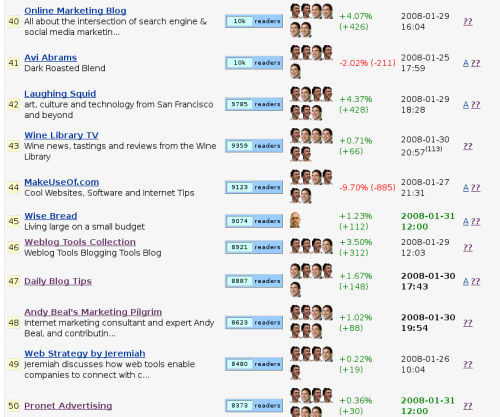
RatingBurner, a relatively unknown new site discovered by Louis Gray, currently has the problem (besides the awful design of the site) of being too selective: many big blogs with huge RSS numbers aren’t included. But, that’s why there’s an option to add a new blog feed, so whoever thinks he/she’s being neglected can add their blog, as long as they’re using FeedBurner to manage their feed.
The idea to rank sites according to FeedBurner is not, in fact, a new one; I once did it by hand which caused quite a positive feedback in the blogosphere. However, since then even I changed my mind about the usefulness of such ranking system, simply because RSS stats are quite volatile and not always a good indication of a website’s popularity. But, it’s a ranking system with positive sides and flaws like any other, and I guess it can’t hurt to have another one. If nothing else, RatingBurner is a good way to find some fresh feeds for your reader.

Well it is actually 62 this week. This new list of 62 free directories for your to submit your site(s) is gathered from all over (forums, suggestions, submissions to my directories, etc.). Many of these directories are new, some are new finds and some are older, but offering free submissions for a limited time.
- Sincrona Directory – PR6
- Submit Directory – PR 6
- Web 1 Directory – PR5
- InfraSec-Conf.org – PR5
- Topsites Directory – PR4
- SampleTec Web Directory – PR4
- UStac.org – PR4
- Karmania.Net – PR3
- 5 Star Directory – PR2
- Maxi23 – PR1
- FreeWebsDirectory.com – PR0
- 9Y6.NET – PR0
- Directory for rank – PR0
- Dabfeed – PR0
- SEO: Project Web Directory – PR0
- Yooley Directory – PR0
- A Free Directory – PR0
- Mix Directory – PR0
- Gathjod Directory – PR0
- CMEP Intl Directory – PRO
- Free 1 Free Directory – PR0
- EastLink Directory – PR0
- Link Holes – PR0
- Any Websites – PR0
- Free Web Directory – PR0
- Link Drip – PR0
- Links Pedia – PR0
- Ferret Seek – PR0
- Link 1 Directory – PR0
- Directorme – PR0
- nicksyear - PR5 - 461 Yahoo back links
- Mvzr Directory - PR3 - 1,160 Yahoo back links
- Digitnext Directory - PR3 - 4,680 Yahoo back links
- EastLink - PR3 - 45 Yahoo back links
- The Web Directory - PR3 - 18,300 Yahoo back links
- Voda Web Directory - PR0 - 40 Yahoo back links
- 0q6 SEO Directory - PR0 - 17 Yahoo back links
- INDUSTRY FACTORY - PR0 - 5 Yahoo back links
- OHXK - PR0 - 0 Yahoo back links
- Great Directory - PR0 - 1,930 Yahoo back links
- The Big Web Directory of US - PR0 - 135 Yahoo back links
- Find Good - PR0 - 577 Yahoo back links
- Sitemoz - PR0 - 227 Yahoo back links
- z0p Directory - PR0 - 0 Yahoo back links
- Internet Stromer Directory - PR0 - 4,280 Yahoo back links
- Internet Ahead - PR0 - 3,620 Yahoo back links
- Link Professor - PR0 - 4,910 Yahoo back links
- MassiveNet Links - PRO - 4,560 Yahoo back links
- Wow Internet Directory - PR0 - 4,600 Yahoo back links
- Find Turtle Directory - PR0 - 4,160 Yahoo back links
- Net Category - PR0 - 3,290 Yahoo back links
- Directory Spider - PR0 - 4,220 Yahoo back links
- My Group Directory - PR0 - 4,290 Yahoo back links
- Hit Boss - PR0 - 1,060 Yahoo back links
- Agii.net Directory - PR0 - 11 Yahoo back links
- OJRJ Directory - PR0 - 4 Yahoo back links
- Yellow Pages - PR0 - 19 Yahoo back links
- ZTDN Directory Network - PR0 - 923 Yahoo back links
- EKWK Directory - PR0 - 1,060 Yahoo back links
- Holiday Dir - PR1 - 653 Yahoo back links
- Your-Bids Link Directory - PR0 - 3,450 Yahoo back links
- KlickNa Link Directory - PR0 - 7 Yahoo back links

Article submission to article directories is and will be the most low cost site promotion technique available on the web. Here are the top 10 reasons why particularly you should submit your article to all article directories out there.
Reason No. 1: It’s Free to submit!
Once you get the account setup and verified, you just need to submit your article via few easy steps and boom your article appears in an article directory.
Reason No. 2: Gives you Expert Status!
Giving your opinion and views, especially when backed up by facts and figures set you up as an expert in your field.
Reason No. 3: Fresh Content for Website!
Each article you write and submit should also be listed on your web site, giving you fresh, quality content.
Reason No. 4 : Free Incoming Links!
You will instantly gain incoming links to your web site from a relevant source. An article on finance with a link to a web site on finance and insurance related website is highly regarded by the search engines
Reason No. 5: Free Website or Product Promotion!
Articles actually allow others to promote you and your website by using your article, including the link to your site, on their web site, blog, e-zine or newsletter. Comments and discussion of your article, ideas and opinions will further your exposure.
Reason No.6: Extra Income!
You might get extra income from people wanting to hire you to write other articles, books, or even ask to speak at seminars. This is a great way to multiply your income. With all the private label article sites springing up daily, there is a lot of content needed to fill the demand, your article writing skills could attract some of these to your door.
Reason No. 7 : No Expiration Date!
Articles submitted to authentic and highly promoted article directory like Articleus usually never expire and be removed under any circumstances except by you. So submitting to the directory will give you long shelf life, drive more traffic even after a year and give you very powerful link back.
Reason No. 8: Broaden your market!
By creating a targeted article on article website you can get your influence out to a broader market segment. You can use the content of article directory to create email newsletters too, where appropriate. You can even combine articles into an e-book to publish, give away or sell.
Reason No. 9: Give your business new style and personality!
Article shows your personality and knowledge about the subject which in turn helps drive customers to your business. People will get to know you and your business through writing and any relationship you build with an online customer or client is a qualified, targeted lead my friend!
Reason No.10: It’s Fun!
Be a part of community by becoming a contributor, a blogger, an author and simply just a viewer.
Top 10 Reasons to submit articles to Article Directory
Blogger, Info, tips / Posted 12.44 0 commentsIn this post, I want to suggest seven ways to step outside the comments section as we’ve known it and start building a community around your blog.
What are the benefits?
- your blog will feel different to other blogs
- interactivity engages readers and creates a positive impression
- interactivity grabs attention — encouraging links, comments, and so on
- a sense of community creates loyal readers
- readers who like you will help you out in various ways
Where do I start?
These are some ideas you can experiment with. Feel free to add your own in the comments section or ask for more information on any ideas that pique your interest.
1. Pick experts
Segment your blog into its main topics and pick a reader to become the designated ‘expert’ on each topic. The expert agrees to answer reader questions on their topic via email and, in return, gets a link back to their site on the ‘experts’ page. This allows loyal readers to effectively become part of the blog while alleviating some of your work load. It also provides a means for new visitors to get their questions answered.
2. Group chats
You could set aside one hour a week for web chats on your blog’s IRC channel (after you make one, of course!). Let your visitors know what time you’ll be available for chatting and make sure to explain your timezone so international readers can determine when they need to show up. This could be a great way for your readers to get to know you and each other.
3. Elevate commenters to bloggers
After all, The Huffington Post is doing it. You could select the month’s best commenter (chosen either by yourself or by the community) and allow them a guest-posting spot on your blog. Readers may aspire to winning the guest-post spot and make a greater effort to comment regularly and intelligently.
4. Put your heads together
Your readers can be an incredible source of knowledge. Write a post with them collaboratively by asking them for tips on a certain topic. Allow them to submit their short tips via the comments section. Publish the tips as a list post, adding in your own points. This allows readers to have a role in creating the content they usually passively consume. Group projects can also result in projects with a depth that would have been difficult for a time-strapped blogger.
5. Add a forum to your blog
You can either host a forum or use one of the many free forum services available online. If your forum grows to be quite popular it can become a defining community and meeting place within your niche. Even if it’s only small it can provide you with an opportunity to get to know your readers. Remember, though, that your forum is a reflection on your blog. If you make it, take care of it.
6. Stop speaking and listen
Every so often take the time to ask questions rather than provide answers. Ask your readers what they like about your blog, and what they don’t like so much. Ask them what they would like you to write about, and what their favorite posts were. Most importantly, take action as a result of the answers you get. You certainly don’t have to radically change the focus of your blog, but do show that you have taken the answers on board. You might do this by writing about some of the suggested topics, or by not writing about some of the things readers expressed disinterest in.
7. Let comments be the content
You could create a weekly post in which you and your readers are encouraged to chat about anything and everything in the comments section, or perhaps provide a broad topic. The post would contain no content other than stating that the comments are open for discussion. Readers could use the post as an opportunity to ask questions and to get to know you and each other. The Guardian Gamesblog seems to make one of these Chatterbox posts each day and they’ve proven incredibly popular (often reaching 400 comments).
Over to you
- What do you do to build a sense of community around your blog?
- Do you have any additional ideas about how this could be done?
The concept seems simple enough. I write about topics that I enjoy, people read it, and I make money off the advertising. To those of us who’ve been doing it for a while, it is simple. To the novice blogger who’s just getting into the business, however, it’s important to realize what you’re getting into.
If you’re new to blogging and interested in doing it for profit, here are a few things to keep in mind before committing yourself.
- Blogging is easy. Blogging for profit is more difficult. I won’t go as far as to say it’s hard to draw a secondary income from blogging, but it’s definitely harder than most people think. It’s not just about producing content and slapping up some ads. Good writing, proper templating, ad placement, developing an audience… there are a lot of skills required to make a blog profitable, all of which you’ll need to learn.
- Blog for the long haul or not at all. A huge majority of blogs fail in the first few months, falling into neglect and disuse. More to the point, few blogs see any profit during the first few months. Unless you can stick with it for at least a year, you’ll probably never see any return for your effort.
- Pick a niche that you love and stick with it. General purpose or multi-topic blogs have difficulty developing a readership. Brainstorm the topics that you care about most, then pick one and blog about it exclusively.
- Start with one blog. If you have a lot of items on your list of possible topics, don’t give in to the temptation to start a different blog for each one. By dividing your effort between several blogs, you increase the likelihood that all of them will fail. Put all of your effort into one blog to start. Once you get the hang of things, then you might consider branching out with additional blogs.
- If you’re unsure, test drive. The fact is that many people don’t have the drive or stamina to blog for profit successfully. If you’re not sure, try a starter blog on a free service such as Blogger or Wordpress.com. Feel it out for a few weeks. If, by the end of this time, you’ve stuck with it and feel like blogging is right for you, go ahead and commit to the effort. This advice applies equally well to test driving new topics if you’re unsure what to write about.
- Place ads wisely. Some people recommend not placing ads on a blog until it has matured somewhat. Others recommend putting them up right away. There are advantages and disadvantages to both approaches. Just be sure to place your ads tactfully so as not to overwhelm your readers. Put the user experience in the first place.
- Enjoy yourself. This is the real key to successful blogging. If you pick a topic that you love and blog about it with passion for months and years on end, your blog will build a readership, generate income, and generally be a success. If, however, your blog becomes a chore to maintain, it will inevitably fail.
The main point I want to convey is that many people try to blog for profit and fail. If you approach the task with the right expectations and some proper planning, you will succeed.
Step 1Begin by visiting the Blogger.com homepage and clicking on the orange arrow that says "Create Your Blog Now".

Step 2 Enter your email address, password, the name or nickname you would like displayed on your blog and security information. Click on the box to accept the Terms of Service.

Step 3 Name your blog by entering the blog's title and address. For most bloggers, the title and address are the same thing. Have second and third choices available for each, however. Your first choice might already be taken.

Step 4 Choose a template from the many available designs.

Step 5 You are now ready to post.

Step 6 Add a title, enter text and click "publish".

-
Recent Comments
-
Feature Posts
